Internet Time sync using NTP servers causes frustration for a lot of Windows users. The following instructions will reset the NTP run-time and adjust the NTP server setting. Make sure you haven't set conflicting settings in Group Policy.
1. The default server, time.windows.com, is just not as reliable as some other NTP servers publicly available. However, the best practice now is to sync to a NTP pool and/or your local university's or ISP's NTP servers. Get the list of servers for your location at the NTP Pool Directory. Example: 0.us.pool.ntp.org 1.us.pool.ntp.org 2.us.pool.ntp.org 3.us.pool.ntp.org
2. Run the following commands from an Administrator command prompt:
Showing posts with label services. Show all posts
Showing posts with label services. Show all posts
18 October 2009


26 November 2008
Parallel Port Driver Service Failed to Start
If you don't have a parallel port on your computer, this is easily fixed from the command line:
sc config parport start= disabled
sc config parport start= disabled
08 May 2008
Uninstall a Service
If you want to delete/uninstall/remove a Windows service, perhaps left from an incomplete installer, you can use the sc command from an Administrator control prompt: sc delete [servicename]
17 March 2008
Services You Should Disable If You Aren't on a Microsoft Network
These being disabled won't affect Internet usage, but you won't be able to do Microsoft networking stuff. For me, those features are more of a liability than a help. Some are disabled by default, because even Microsoft has determined that they are risky.
- Alerter
- ClipBook
- Computer Browser
- Distributed File System
- Distributed Link Tracking Client
- Messenger
- Net Logon
- Net.Tcp Port Sharing Service
- Netmeeting Remote Desktop Sharing
- Network DDE
- Network DDE DSDM
- Remote Registry
- Server (and uncheck Client for Microsoft Networks and File and Printer Sharing in your network connection properties)
- TCP/IP NetBIOS Helper (and disable NetBIOS over TCP/IP in your network connection TCP/IP properties)
- Telnet
- Terminal Services Session Directory
- Distributed Link Tracking Server
- Error Reporting Service
- IMAPI CD-Burning COM Service (unnecessary if you have burning software, I believe)
- Indexing Service
- Intersite Messaging
- Kerberos Key Distribution Center
- License Logging
- Network Provisioning Service
- Performance Logs and Alerts
- Remote Desktop Help Session Manager
- Routing and Remote Access
- Smart Card
- WebClient
Some Services Are Just Supposed to Run "Manual"
I tweak with Services settings for better security and performance, but it's a silly endeavor, because the services themselves are quirky: they might not start correctly if they are set to Manual when they should be Automatic (3rd party services especially, it seems) and vice versa!
Here are some services that should have their startup types be Manual even though they are running most of the time:
Here are some services that should have their startup types be Manual even though they are running most of the time:
- COM+ Event System
- Network Connections
- Network Location Awareness (NLA)
- Remote Access Connection Manager
- Telephony
- Terminal Services
16 March 2008
2 Nice & Free Security Utilities: Seconfig and SpywareBlaster
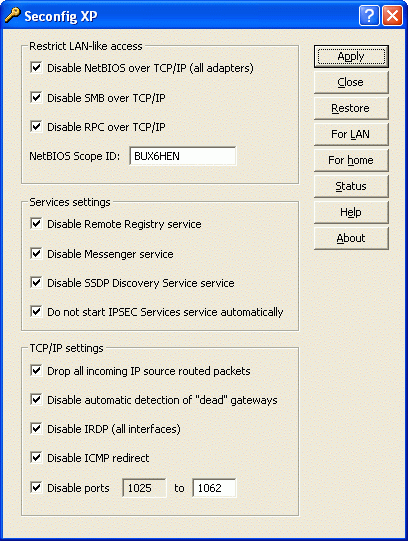 What's nice about these is that they help secure your machine without having anything run in the background to slow you down at all: Seconfig and SpywareBlaster
ToolTipFixer failing to launch in Windows 2003

I am a big fan of TooltipFixer which fixes a Windows shell bug where tooltips in the notification area would be eclipsed by the taskbar itself.
In Windows 2003, the service would have problems at startup and trigger the annoying and unhelpful: "At least one service or driver has failed to start" error dialog. This can be fixed by adjusting the properties of the NST ToolTipFixer service to log on as "Local Service" rather than "Local System".
The Annoying Icon that says "Acquring Network Address" When You're Already Connected
This complaint is all over the web, but I first saw a solution at DSL Reports
Using Intel Proset/Wireless software to manage wireless network connections, there was a weird and annoying issue where connection to a wireless network would work fine, but the little notification area wireless icon would animate endlessly with the tooltip "acquiring network address." Using the Hide Inactive Icons feature of the Start Menu control panel didn't work; the icon would reappear. This KB article is no help either.
The problem is that the Network Location Awareness Service wasn't running. Launch services.msc and change its startup type to Manual.
Using Intel Proset/Wireless software to manage wireless network connections, there was a weird and annoying issue where connection to a wireless network would work fine, but the little notification area wireless icon would animate endlessly with the tooltip "acquiring network address." Using the Hide Inactive Icons feature of the Start Menu control panel didn't work; the icon would reappear. This KB article is no help either.
The problem is that the Network Location Awareness Service wasn't running. Launch services.msc and change its startup type to Manual.
Subscribe to:
Posts (Atom)

