#IfWinActive ahk_class rctrl_renwnd32
^RButton::
  MouseGetPos, , , , pane
  If pane = SUPERGRID1
  Send {Click}^d
  else
  Click right
  return
RButton::
  MouseGetPos, , , , pane
  If pane = SUPERGRID1
  Send {Click}!q
  else
  Click right
  return
#IfWinActive
14 January 2009
Ctrl-RightClick to Delete Messages in Outlook
An amendment to previous posts:


06 January 2009
Fix Wireless Network Reconnection
If you're having problems with reconnecting to your wireless network after wake/resume from sleep/standby, or if you are getting errors upon connecting due to cancellation or timeout, or if you are having other problems with your wireless in Windows XP SP2 or Vista, try these solutions:
Norton AntiVirus 2009 is Surprisingly Good
I've been down on Norton/Symantec products in the past, but Norton AntiVirus is the best antimalware application I've ever used. It's fast, efficient, and protects Firefox. I got my copy for $20 after rebate at Staples, and there might be other good deals elsewhere.
Update: I now more fond of Microsoft Security Essentials, which is free.
Update: I now more fond of Microsoft Security Essentials, which is free.
Right-Click to QuickArchive in Outlook
The following AutoHotkey code makes right-clicking a shortcut for QuickArchiving in Outlook, but (helpfully) only if a message is being right-clicked. Otherwise, there is normal right-clicking behavior.
02 January 2009
White Too Harsh? Soften the Background Color
Using Microsoft Office Outlook, I noticed the background was such a bright white that it hurt to look at it. The background color is sort of customizable by adjusting the system color for windows as follows:
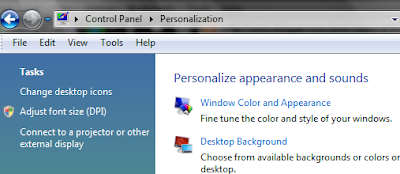


- For RGB values, use the same number between 245 and 255


30 December 2008
Improving Wireless Networking on Vista (and XP?)
Some commands for the Command Prompt:
- netsh int ipv4 reset
- netsh winsock reset
- netsh int tcp set global rss=enabled chimney=disabled autotuninglevel=normal congestionprovider=ctcp ecncapability=enabled timestamps=disabled
- ipconfig /release
- ipconfig /renew
- DhcpConnForceBroadcastFlag 0
29 December 2008
QuickArchive: More About Gmail-like Archive in Outlook

Expanding upon this earlier post, I started using AutoHotkey so that Shift Right-Clicking a message in Outlook archives it and Ctrl Right-Clicking deletes it. To do so, I changed the toolbar name for the ArchiveSelected macro to "&QuickArchive" (without quotes). An ampersand in a toolbar item name underlines the following character so that the button may be "clicked" via a keyboard shortcut: in this case Alt-Q. Why "Q"? Well, every other letter I tried was already taken by a menu or another toolbar item.
Then, I added the following to my main AHK script:
#IfWinActive ahk_class rctrl_renwnd32
+RButton::
Send {Click}
Send !q
return
^RButton::
Send {Click}
Send ^d
return
#IfWinActive
27 November 2008
Apps I'm Thankful For
- Everything (Search)
- Firefox
- AutoHotkey
- MWSnap
- Taskbar Shuffle
- Norton Antivirus 2009
- Digsby
- Audacity
- MP3Tag
- SpywareBlaster
- TrueCrypt
- Windows Vista
- Nirsoft
- Console Calculator
- GOM Player
- MP3 to Ipod Audiobook Converter
26 November 2008
Parallel Port Driver Service Failed to Start
If you don't have a parallel port on your computer, this is easily fixed from the command line:
sc config parport start= disabled
sc config parport start= disabled
21 November 2008
Disable Wireless LED with Gigabyte GN-WI06
HKEY_LOCAL_MACHINE\SYSTEM\CurrentControlSet\Control\Class\{4D36E972-E325-11CE-BFC1-08002BE10318}\0008
In the registry key above, changing the value for LinkLedFunc to 00 from 03 effectively disabled the WLAN indicator LED. Simply deleting the LED keys did not do the trick.
In the registry key above, changing the value for LinkLedFunc to 00 from 03 effectively disabled the WLAN indicator LED. Simply deleting the LED keys did not do the trick.
Subscribe to:
Posts (Atom)

